






Showing posts with label Nonnas Scraps. Show all posts

September 14, 2012

Ohh! Scary Little Ghosties!

Hi all! This is Jeannie with Nonnasscraps. I am so excited to be back over here  as guest today. I am always so humbled to be here.
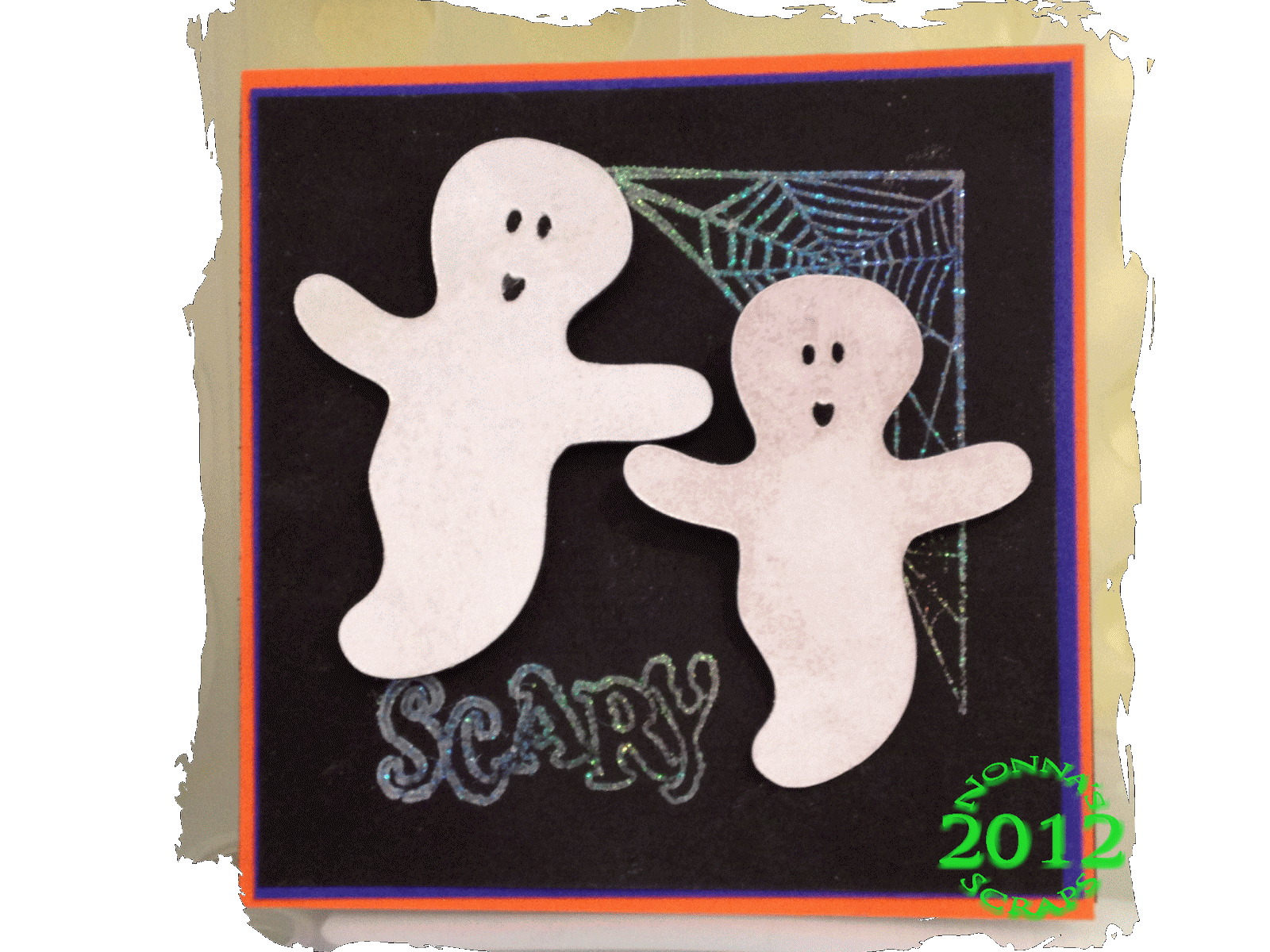

I saw these adorable ghosts in the September 2012 issue of CardMaker magazine and I knew I had to do something with them! Since I subscribe to the digital edition it was easy! I chose the page on my I Pad and sent the PDF page to my printer. I then took the print-out and scanned it, creating a .jpg image on my computer. From there MTC took over and it helped me bring this cuties to life!

4 x 8" cardstock base (to create a 4" sq. card)
1-4" square orange cardstock
1-3.75" square purple cardstock
1-3.5" square black cardstock
6" square white irridescent cardstock (ghosts)
6" square black cardstock (ghost backing)
Embossing glue
Stampendous Kaleidescope Embossing Powder
Hampton Art "Outlines" Stamps (from Michaels)
September 2012 issue of Cardmaker magazine

1. Import the graphic for tracking. I used the default settings and it traced well.  


2. I had a few spots to clean up (note the green circles). With the cut selected, I chose break from the menu; I could simply click on the bits that I did not want and delete.


3. I then duplicated this little guy. I have my settings circled in green. Click on apply.


4. I chose one image and selected the icon to blackout the image. This will become the black backing for the white ghost.

5. Select both images and duplicate for a total of 4 cuts. 


6. I then chose one set and (ghost with eyes and blackout) and decrease the size 1/4". The larger ghost is approximately 2 3/4" long.

7. I arranged the cuts so that I would be able to mat a 6" square on the top and on the bottom. In that way I can cut the ghosts from the correct color -- at the same time! 


8. I layered the squares in this order: 4" orange, 3. 75" purple, 3.5" black. I then stamped the sentiment and the web with the embossing glue. I sprinkled the powder and heat set it. The final step was pop-dotting (is that a word?) the ghosties in their spots. 

Ohh! Scary little ghosties! Have a Boo-tiful month! 


June 8, 2012

Just a Note.....

Wow! It is hard to believe that June is finally here! I love teaching, but I love summer break as well! Time to play means time with friends; thank you Sassy Lady for allowing me to play with you on your Blog! 

Because it is soon to be summer, the need for bright, happy summer colors was imperative! 
Sending "Just a Note" to someone this summer could just brighten their day. And can make one, too!


Design House Digitals Paper : Cherry Limade
My Thoughts Exactly Stamps: Just a Note "Big Thoughts"
Kaleidoscope Creator Software (KK3)
Assorted glue
ribbon
  • I started with a picture from my photo library of all things, "Peeps". (It was colorful and made me smile!) Using the KK3 software I selected the "Feathers" add on and brought in the photo. 

  • In the image above, the center section shows my photo and the feathers template. the preview pane to the right shows the kaleidoscope. Beneath it is the color I chose for the background. 
  • I selected File: Save: Kaleidoscope and set the size to 3" square. (You can change this to any size you need!)
  • Set up your cuts for the Card Map according to your desired method. I use Make the Cut Software. 
  • Here are suggestions for various software/ cutting machines:
    • Make the Cut: Use the texture feature and fill the shapes from the card. For the kaleidoscope: Import : pixel trace: set threshold to 255. 
    • Cricut machines: Print paper from home printer in 6" squares. Use Cricut Craft Room or your Gypsy to replicate the shapes of the card. Cut from paper squares. 
    • Manually cut shapes from paper. 
  • Assemble card and stamp. Lace ribbon through holes. 
Would you like to use my kaleidoscope, too? You can download the summerfun.PNG file by clicking here. 
This design is a free gift from me to you. Please give me credit if you use it and do not use it for resale. Thank you for respecting this! 

Thanks for sharing a few moments of your soon to be summer with me!