






Showing posts with label Vinyl. Show all posts

March 29, 2016

Vinyl Pillow

It's Sandy from Ukiah here again.  I had something totally different that I was going to post, but it didn't work out.   So I had to come up with another plan.  I liked this one better anyway.  It is really an easy project, it just takes a bit of time to get it completed.


Isn't this about the cutest thing ever!  I saw this and just had to make one for my friend's grandson.
Then it turned out so cute I have decided to make each of my kids one for Christmas.  But instead of the dog I am going to put a red heart. (my kids are all grown up, but I think it's adorable).


So the first thing you need to do is get a pillow, I like the black pillow with the white vinyl lettering, but you could use any color of pillow and what ever color vinyl you want for the lettering. 


You need to use the HTV vinyl. I used my Silhouette, you can use the Explore, but I liked using the Silhouette for this project.  You cut out the design on the HTV vinyl .  Don't forget to mirror your design.  It looks like there is nothing there, gave me a little scare the first time I used the HTV.  But it is there. 


The next step is weeding it.  This is what it looks like after you are done with the weeding.  With the HTV vinyl you don't need transfer tape.  


 So now you are ready to  put it on your pillow and press it with your iron.  I don't have a heat press (but I am getting one, I am very excited about that).


And here is the final result... I am really pleased with it.  And like I said it is really an easy project, it just takes a bit of time to it.  Thank you for stopping bye and I hope you enjoyed my project as much as I enjoyed making it. And thank you again for having me as one of your guest designers Sheila.  

~ sandyfromukiah

March 24, 2016

A Fun Project

Sandy from Ukiah here again. I am excited to share with you this project I made for my grandson's birthday.  I am not doing a video today, I really would rather do a video but with my project it would have been to hard (for me) to do a video of it.  So I have taken pictures of each step.


I started with a plain white 12x24 canvas.  I forgot to take a picture of it before I started painting, so I went back down to the store and took one there.  


The next step wasn't too bad,  all I had to do was paint the canvas.  I used Artist's Loft Acrylic paint, I first use Unbleached Titanium, but I felt it was to light of a color, so I painted over it Naples Yellow, I think it looks better. 


So while the paint is drying I cut out the guitar in black 631 Vinyl.  Was a little nervous about doing the vinyl, but it turned out pretty good.  The weeding took me about an hour to do.


The next step was a little stressful.  I had to measure where I was going to put the guitar, the sun and the water... My sweet husband was good to help me with the measurements.  I was a bit upset because I didn't make swirls for the water.  


I used Artist's Loft paint Cerulean Blue and Titanium White for the sun and the water.  I mixed the Cerulean Blue and Titanium White for the sun.  And just used the Cerulean Blue for the water.
So now the part I was dreading, "did I measure it right for the sun to be where I wanted it."


Yes, it went on perfectly... I don't know why the color looks so different in each picture.  I suppose it is the lighting when I take the pictures.


So here is the finished project.  
I decided to add a quote that he mentioned in his graduation speech.  I hope he likes it.
I am pretty happy with how it turned out.
Thanks for taking the time to stop by, I hope you enjoyed my project this month.
Remember to leave a comment click on the RED G+.
And thank you again for having me as one of your Designers Sheila.


February 6, 2015

Custom Gift and a Hello!

Hello Everyone!

My name is Kenya and I am one of the newest members of She’s a Sassy Lady! I am so ecstatic about being a part of this group and being able to share my projects with each of you! I hope you enjoy them just as much :) I also hope to bring a little sassiness to the team!

Just to share a little about myself: I am a married. My husband and I celebrated 15 years of marriage back in December. We have four daughters (10, 8, 6 (will be 7 next week) and 5 years old) and one son (4 months old). Yep, you read right; I am a mother to five wonderful children! I have been an “official” crafter for 5 years. I like to create everything from cards to mixed media! I am a cutting machine/tool junky! You will get to know that more as time progress LOL.

For my first project, I made a custom gift for someone. This gift was inexpensive to make as well as easy! I purchased a glass cutting board from the Dollar Tree. I already had vinyl on hand from a  different project and I used a file from the Silhouette Store. 

I opened Silhouette Studio Software and placed my image on the virtual mat. I did not need all of the parts of the file. I ungrouped the image and deleted what I did not need. 


Next I resized my image and moved the utensils how I wanted them on the mat. I then used a true type font for the name of the family. I used the Character Spacing/Kerning feature in the software which can be found under Text Style. Once I was satisfied with the kerning, I welded the name together. 


I grouped all of the images. Because the vinyl was going on the underside of the glass, I had to flip the image. 

I cut out the image and applied it to the cutting board. I must note, I cleaned the cutting board prior to applying the vinyl to ensure good contact of the vinyl to the glass. This is very durable and should last the recipient for years to come. 


I hope you enjoyed today’s project! I look forward to share the next project. Until next time, be safe, have fun and CREATE!! Kenya~

September 13, 2013

Bathroom Wall Art

Hello everyone. It's Danita, from danitasdesigns.blogspot.com. It's been a very busy time for me these last few weeks.  I was preparing for my daughter's 27th birthday so I didn't get too much craftiness for myself done. I did manage to revive our Master bathroom and the guest bathroom walls. It was a bit of a challenge for the guest bathroom as the hubby proclaims this to be his turf when we don't have company and he doesn't wanted it all "girlied up" like the master. If it were up to him, there would be nothing on our walls at all! I personally cannot stand to see a blank wall.  I think the walls need to have a little character, don't you? Anyway, here's what I did: (I forgot to take before pics so I had to blot out the vinyl areas in the photo)  
Before - The "Man" Bathroom
 
After-still masculine, but much nicer.
These are $2.00 towels I got on clearance.  This was my very first time using my embroidery machine!
Before -  Master Bath
After -  Master Bath
Close up view
 
This piece is actually cut  for the "man" bathroom, but hubby wasn't having it. lol   I wasn't going to throw it away, so I found a spot in the Master Bathroom.
 
Now, these are some projects I did a long time ago for my daughter's home and I thought I'd share them with you also.  I actually did these with my Cricut!
This is her Master Bathroom
 
The downstairs bathroom. I tried to coordinate everything!
 
Baseboard
 
Butterflies flying up the wall
 Thanks for looking and please come by and visit me at http://www.danitasdesigns.blogspot.com/

January 15, 2013

Calming Butterfly!

Hi there everyone, it's me - Karon - from Karon's Krafty Korner to share a little bit of creativity with you today.

My daughter, Shannon, is busy studying and doing last minute assignments for her first semester(just ending) at High School.  She was getting a little stressed out the other day, so I decided to make her a notice for her room.

Now you no doubt have been seeing these all over the web, but this is my version for my daughter.


I have recently (thanks to my darling hubby) come into the possession of a Silhouette Cameo and have been enjoying playing with it.

For my project, I took a dollar store 8" by 10" canvas and painted it lilac - one of Shannon's favourite colours.


Exciting isn't it!  LOL!

Next came the vinyl cut - oh it was so easy to do - picked a font - typed up what I want and cut away!


Now, I know I could have taken the easy way out and centred it all and left space, but I'm not one to waste vinyl, and I could have saved more, but wasn't thinking when I took off the excess stuff. So, to position the words straight on the canvas, I take each word and using the transfer tape (Walmart clear contact adhesive - shelf liner!) and a piece of straight card stuck just underneath the wording, I am able to position them.


The one thing I did find, with working on the canvas is that you need to burnish (as in rub) the vinyl quite well  so that it adheres to the canvas.  I used my little Cricut scraping tool.


Next came the butterfly.  The file for this comes from Birds Cards, oh my she has some amazing files and all are free and she is constantly adding to them.  There are two butterflies with shadows - I used one of them and then the hearts are from the inside wings of the other :-)

I chose a butterfly to add to this project, because they always look so calm and peaceful, just fluttering around.  The hearts are just to show my daughter how much she is loved and to just not stress!

Sorry, I meant to show the cut too - but you know how it goes.  Here's a close up of the butterfly with the bling:-)  The different colour bling was to add a pop of colour other than the lilac. I used the Swiss Dots embossing folder for the butterfly and the Devine Swirls folder for the hearts.


I added some Smile ribbon around the edge of the canvas using strong double sided sticky tape.  To remind Shannon to keep on smiling :-)


Staple gunned the ribbon to hang it - so it won't come off and used some little buttons and twine to hide the staple, attached these using the hot glue gun :-)


So that's it for this months visit.  Thanks again for putting up with me Sheila.


Happy crafting everyone.

August 30, 2012

The Keys to my Heart

Hello, everyone, it is Jeannie from Nonnas' Scraps and I am so excited to be the guest designer on Sheila's blog today!

We renovated our downstairs a couple of years ago. and it has taken me until now to decide what type of "art" I want on my walls. My kids and grandkids are honestly the keys to my heart, so what better art for my home? Thanks, HGTV, for the great ideas for family photos!


Ingredients
8 x 10" canvas (Michael's or Wal-Mart)
Krylon spray paint
My Sketch (or other photo editing software)
cardstock
Lettering Delights SVG files: Keys
Make The Cut Software
Assorted glue

Steps

Spray the canvas with the Krylon paint in a well ventilated area. I actually taped off an area in the picture, but later went back and sprayed the whole front of the canvas. Let dry


Adjust the photo in My Sketch (for more information click here.) Save the photo to be traced in MTC.

Select File: Import Pixel Trace and choose the photo from the correct file on your computer.  

Adjust the settings so that the entire photo is green. Set alpha to highest number, Threshold 255, scale so that the size is of your choosing--no larger than 8 x 10 and finally select Import

When prompted, select no.


Send the graphic to your home printer to be printed and then cut in the MTC software. I used my Zing and this vinyl cuts like butter! Zing settings: Speed 10, Force 8, Red blade with offset of 0.35, one pass. 
You can simply print the photo and trim with scissors or a paper cutter. 

Apply the vinyl photo to the canvas. Peel the vinyl from the backing; position as desired on the front (spray painted) canvas. Turn the canvas over and lay face down on a clean, firm surface. With firm pressure, roll a breyer/roller over the back of the canvas. 


Flip the canvas right side up. Gently roll the vinyl to secure to the canvas.

I was going to stop here, but decided this art needed more! So, I opened a set of keys in my MTC. Notice that I duplicated each of three keys so that each totalled three in number. I planned to cut these from cardstock so three stacks well and creates a thicker product. 

I then set up my cardstock for cutting: 


On the Zing I was able to cut the keys using the WYSIWYG mode with the following settings:
Force 80, Cut one time, Red blade offset at 0.35. The result:

Hmm....looks like I have some really cool corners for my photo from the inside of the heart keys!
I have to admit that in the end, I did not like the keys all the same size as pictured above. I recut one set smaller and was much happier with it. 

To complete the art, glue the keys and the corners around the vinyl edge. As I looked at it I realized that the next time I am in a craft store I will look for either a chain or a cord with tassel to add just a bit more dimension. And in the end, tying up those keys just ties up my heart even more! 


January 27, 2011

A Little Treat for Four Feet!


Hi ya everyone this is Melissa from MelissaMade and once again I'm back and ever so excited to share a project with all of the wonderful followers at She's A Sassy Lady.  Thanks Sheila for letting me share again today!  My hubby and I have friends that lost their old doggy and recently got a puppy!  He is ADORABLE - a black golden doodle - now have you ever heard of a BLACK golden doodle! LOL he is just the cutest so we decided to make Dexter a little gift.
 I started with a left over jam jar.  I removed the label and ran the jar through the dishwasher.  I measured the height of the jar and the diameter of the lid.  My jar is about a 4 inch high jar and the lid is about 2 inches across. I also took a sheet of paper and measured around the outside of the jar and it was close to 8 inches.  On my Gypsy I used the new Lite cartridge Four Legged Friends and placed paw prints randomly around the page.
 Next, again with my Gypsy, I made a circle and it's shadow using George and Basic Shapes for the 2 inch lid.  I also added the sentiment from Four Legged Friends that says "Wet nose Warm heart".
 I cut a sheet of brown vinyl on my Imagine for the paw prints.
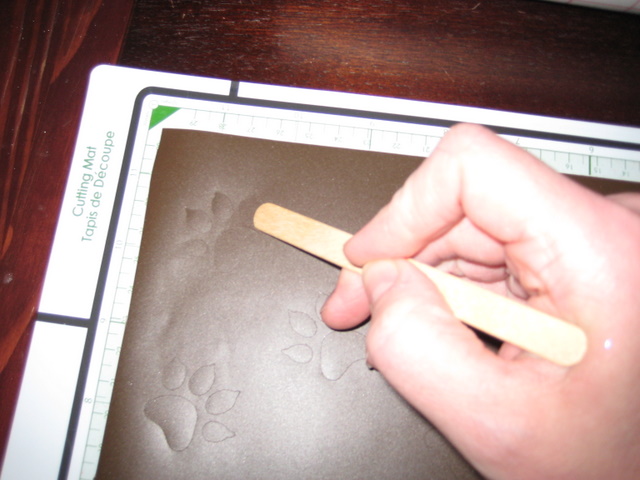
 After the prints were cut, I rubbed them down with a flat wood stick and took a sharp tool and peeled away the layer of vinyl I wasn't going to use.
 I just poke through the top layer and peel back at a sharp angle making sure that no prints came away with the excess.
 I used transfer tape and again using my wooden stick rubbed the paw prints so they would adhere to the transfer tape.
Next, I peeled back the tape at a sharp angle making sure the paw prints came with it.
 My hubby helped here by holding the jar as I wound the tape around the jar.
I rubbed all the prints to the jar and slowly peeled back the transfer tape.
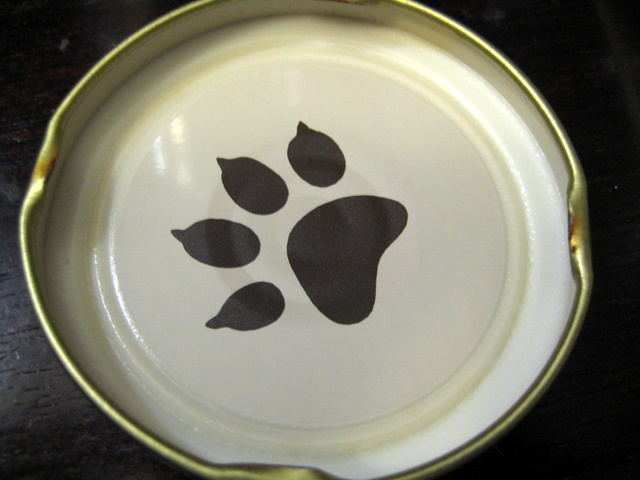
  I also added one little paw print to the inside of the jar lid.
 Next, I cut the circles and sentiment with the Imagine and adhered the circles together using my Xyron.
 I then glued the words to the sentiment.  I used my ATG gun and taped the round tag to the top of the lid.
 I used some beautiful crinkle ribbon and tied a little bow around the top of the jar.  Finally, I added some milk bones!

I hope that Dexter enjoys his treats and his little treat jar.
Thanks Sheila for having me back and don't forget to ask questions if you have them and stop by MelissaMade for more fun projects!
Hugs
Melissa